 United States/English



 Baseus Store
 Amazon
 Walmart

A magnetic power bank is supposed to feel simple.
You attach it to the back of your phone, the magnets line up, and charging starts. No loose cable, no separate wall charger, and no awkward phone position. That is the whole point of magnetic wireless charging.
So when it does not work, it feels more confusing than a normal cable problem.
Maybe the power bank snaps onto the phone but nothing happens. Maybe charging starts for a second, then stops. Maybe the phone charges only when you press the battery pack into a certain position. Or maybe the same power bank works with one phone but not another.
If your magnetic power bank not charging wirelessly, it does not always mean the product is broken. Wireless charging depends on alignment, case thickness, temperature, phone compatibility, and the charging standard your device supports.
The good news is that most issues are easy to narrow down.
Before replacing your charger, start with these five checks.
Check Magnetic Alignment First
Wireless charging depends on coil alignment.
Inside the phone and inside the power bank, there are charging coils that need to sit close to each other in the right position. When those coils line up properly, power can transfer more efficiently. When they are slightly off, charging may slow down, stop, or fail to start at all.
This is one of the most common reasons for magnetic wireless charging not working.
A magnetic charger is designed to make alignment easier, but it still needs the right phone, the right case, and a clean connection. If the magnets do not snap firmly into place, or if the power bank sits too high or too low on the phone, the charging coil may not be where it needs to be.
The Wireless Power Consortium explains that Qi2 uses magnetic attachment to align devices and chargers more accurately, which improves usability and charging efficiency. Qi2 25W also builds on that magnetic alignment for faster wireless charging on compatible devices.
In practical terms, take the phone out of your hand and place the power bank carefully on the back. Let the magnets guide the position instead of sliding it around quickly. If charging starts in one position but not another, alignment is probably the issue.
This is also why a Qi2 power bank not charging can sometimes be a phone or case problem rather than a power bank problem.
Remove Thick, Metal, or Non Compatible Cases
Phone cases are another common cause of wireless charging failure.
A thin magnetic compatible case usually works fine. A thick case, wallet case, metal plate, ring stand, pop grip, or non compatible magnetic case can interfere with the connection between the phone and the power bank.
This matters because wireless charging does not behave like wired charging. With a cable, the connector either fits or it does not. With wireless charging, distance and material matter. Even a few extra millimeters can reduce efficiency or stop charging.
If your MagSafe power bank not charging, remove the case and test the phone directly on the power bank. This is the fastest way to know whether the case is part of the problem.
Wallet cases deserve extra attention. Cards, magnets, metal plates, and thick folding layers can all affect wireless charging. Some accessories are useful for daily carry, but they are not always friendly to magnetic wireless charging.
If the power bank works without the case, the fix is simple. Use a thinner magnetic compatible case, or charge without the case when needed.
For wireless power bank troubleshooting, this should be one of the first steps. It takes less than a minute and often explains the issue immediately.
Let the Phone and Power Bank Cool Down
Heat can also stop wireless charging.
Wireless charging naturally creates more heat than many wired charging setups because energy transfers through coils instead of a direct cable connection. If the phone is already warm from navigation, gaming, video recording, mobile data, or direct sunlight, the charging system may slow down or pause to protect the battery.
This can make it look like the power bank is failing.
In reality, the phone may be limiting charging because the temperature is too high. This is especially common during summer, in cars, near windows, or when using demanding apps while charging.
If your magnetic wireless charging not working after the phone has been under load, let both devices cool down for a few minutes. Remove the case, stop heavy apps, and avoid charging in direct sunlight.
Do not place the phone under a pillow, in a closed bag, or on a soft surface while charging. Heat needs space to escape.
This does not mean magnetic charging is unsafe. It means heat is part of the charging environment, and modern devices may reduce power when temperatures rise.
If the power bank starts working again after cooling down, the problem was probably thermal behavior, not a dead charger.
Check Whether Your Phone Supports Magnetic Wireless Charging
Not every phone works with a magnetic wireless power bank in the same way.
Some phones support magnetic alignment directly. Some support wireless charging but need a compatible magnetic case. Some phones do not support wireless charging at all.
This is where compatibility becomes important.
A Qi2 power bank not charging may be caused by using a phone that does not support Qi2, magnetic alignment, or the wireless charging speed you expect. Even if the power bank supports fast wireless charging, the phone will only take the power level it can safely accept.
The same idea applies when a MagSafe power bank not charging works with one iPhone but not another device. The charger may be fine, but the phone or case may not support the required magnetic positioning.
Before assuming something is broken, check three things.
First, confirm that your phone supports wireless charging. Second, check whether it supports magnetic wireless charging directly or needs a compatible case. Third, make sure the phone is placed correctly on the charging area.
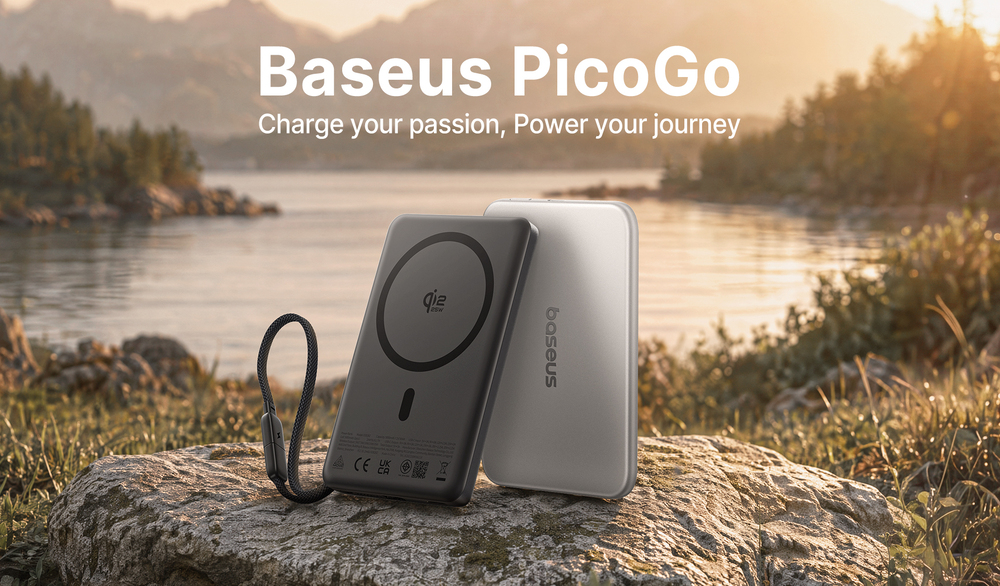
The Baseus PicoGo AM52 Qi2.2 Magnetic Power Bank with Cable is designed around 25W magnetic wireless charging, 10000mAh capacity, and dual device fast charging, but the actual wireless charging experience still depends on phone compatibility.
That is normal for wireless charging. The charger and the phone have to work together.
Use the Built in Cable When Wireless Is Not the Best Option
Wireless charging is convenient, but it is not always the best method.
If your phone is hot, the case is too thick, the battery is very low, or you need a faster boost before leaving, wired charging can be more reliable. This is why a power bank with built in cable is useful. It gives you a backup method without asking you to carry another cable.
This is also where the PicoGo AM52 fits naturally into the problem.
The Baseus PicoGo AM52 combines 25W magnetic wireless charging with a 45W integrated USB C cable, according to the product page. It is built for people who want the convenience of magnetic wireless charging but still need faster wired charging when the situation calls for it.
That makes sense in real use.
You can use magnetic wireless charging when you are walking, commuting, sitting at a desk, or checking your phone while it charges. Then, when wireless charging is not the best option, the built in cable gives you a direct wired connection.
A magnetic power bank not charging wirelessly does not always mean you are stuck. If the power bank has a built in cable, you can still charge while you diagnose the wireless issue.
This is one reason hybrid power banks are becoming more practical. They do not force you to choose between convenience and speed.
Extra Checks Before You Replace the Power Bank
If the five fixes above do not solve the problem, there are a few more things worth checking.
Make sure the power bank itself has enough battery. Some wireless power banks may not start wireless output when the battery level is too low. Recharge the power bank fully, then test again.
Check whether there is dust or debris between the phone and the power bank. Wireless charging needs close contact, so anything that keeps the surfaces apart can reduce reliability.
Restart your phone too. This sounds basic, but charging detection is partly controlled by software. A restart can sometimes clear a temporary charging or accessory issue.
Finally, test another compatible phone if possible. If the power bank charges another phone wirelessly, the issue is probably with the first phone, case, settings, or compatibility. If it does not charge any compatible phone, then the power bank may need service or replacement.
Wireless power bank troubleshooting works best when you isolate one variable at a time. Alignment, case, heat, compatibility, battery level, and device testing each tell you something different.
What to Look for in Your Next Magnetic Power Bank
If you are replacing an older power bank, do not only look at capacity.
A good magnetic power bank should have strong alignment, modern wireless charging support, safe thermal design, and a wired backup option. Capacity matters, but the whole charging experience matters more.
A 10000mAh battery size is a practical middle ground for daily carry and travel. It gives you more backup power than a small emergency charger without becoming too bulky.
A power bank with built in cable is also useful because it removes one common failure point: forgetting the cable. If wireless charging is interrupted by heat, case thickness, or compatibility, wired charging is still available.
The PicoGo AM52 is a good example of this approach because it combines Qi2.2 magnetic wireless charging, a 45W integrated USB C cable, 10000mAh capacity, and dual device fast charging.
That kind of design is better suited to how people actually charge today. Sometimes you want snap on wireless charging. Sometimes you need wired speed. The best power bank should handle both.
Conclusion
If your magnetic power bank not charging wirelessly, start with the simple checks before assuming it is broken.
Most problems come from alignment, thick cases, heat, phone compatibility, or device settings. In many cases, removing the case, cooling the phone down, repositioning the power bank, or checking wireless charging support will solve the issue.
If wireless charging still is not the right option, a power bank with built in cable gives you a practical fallback. That is why hybrid designs like the Baseus PicoGo AM52 make sense for daily use. They support the convenience of magnetic wireless charging while keeping faster wired charging available when you need it.
To explore more portable charging options, visit the Baseus power banks collection.
FAQs
Why is my magnetic power bank not charging my phone?
Your magnetic power bank may not be charging because the coils are not aligned, the phone case is too thick, the phone is too warm, the power bank battery is low, or your phone does not support magnetic wireless charging.
Why is magnetic wireless charging not working with my case?
Magnetic wireless charging may not work with thick cases, metal cases, wallet cases, ring stands, or cases without proper magnetic alignment. Remove the case and test again to confirm.
Why is my Qi2 power bank not charging wirelessly?
A Qi2 power bank not charging wirelessly may be caused by poor alignment, phone incompatibility, a non compatible case, heat, or low power bank battery. Qi2 works best when both the charger and phone setup support magnetic alignment.
Why is my MagSafe power bank not charging?
A MagSafe power bank not charging can be caused by case interference, incorrect placement, heat, or a phone that does not support magnetic wireless charging. Try removing the case and repositioning the power bank.
Is wired charging better than wireless charging?
Wired charging is often faster and more reliable, especially when the phone is hot or low on battery. Wireless charging is more convenient for quick top ups and phone use while charging.
Why choose a power bank with built in cable?
A power bank with built in cable is useful because it gives you a wired backup without carrying an extra cable. It is helpful when wireless charging is slow, interrupted, or not supported by the phone.
Can heat stop wireless charging?
Yes. If the phone or power bank gets too warm, wireless charging may slow down or pause to protect the battery. Let both devices cool down before trying again.