 United States/English



 Baseus Store
 Amazon
 Walmart

A charging hub and a docking station can look similar at first.
Both sit on a desk. Both reduce cable clutter. Both can connect to multiple devices. If you are building a cleaner workstation, it is easy to assume they do the same job.
They do not.
The real difference in docking station vs charging hub is not only the number of ports. It is the role each product plays in your setup. A charging hub is mainly built to power devices. A docking station is built to connect a laptop to a complete workstation, including monitors, storage, accessories, internet, and charging.
That difference matters more now because modern desks have become more complicated. A laptop often sits next to two monitors, a phone, a keyboard, a mouse, an external drive, a webcam, and sometimes a tablet or earbuds case. At that point, power alone is not enough. The workstation also needs data, display support, and stable connectivity.
So the question is not which product is better in every situation. The better question is which one solves the problem you actually have.
What a Charging Hub Is Built For
A charging hub is built for power first.
Its main job is to charge several devices from one place. That can include a phone, tablet, earbuds, smartwatch, power bank, handheld console, or sometimes a laptop. For a desk, bedside table, kitchen counter, or travel bag, this can be very useful.
A good charging hub helps reduce the number of wall adapters you need. Instead of using three or four separate plugs, you can use one compact charging point. This makes the setup cleaner and easier to manage.
The limitation is that most charging hubs are not designed to expand a workstation.
They may have several charging ports, but they usually do not handle external monitors, Ethernet, SD cards, data transfer, or multiple desktop accessories in the same way a laptop docking station does. Their purpose is simpler: deliver power to devices.
That is why a charging hub is a good solution when the main problem is battery management. If your phone, tablet, earbuds, and watch all need charging at the end of the day, a hub makes sense.
But if you want your laptop to connect to displays, drives, peripherals, and network access, a charging hub will probably feel limited.
What a Docking Station Is Built For
A docking station is built for desk connectivity.
It turns a laptop into the center of a larger workstation. Instead of plugging monitors, storage, Ethernet, keyboard, mouse, power, and other accessories into the laptop one by one, you connect them through the dock.
This is where a USB C docking station becomes useful. With one main connection to the laptop, the dock can manage display output, data transfer, device charging, network access, and accessory connections.
A docking station is not only about having more ports. It is about making the laptop easier to use as a desktop computer.
For people who work from a laptop all day, this is a major difference. You can sit down, connect one cable, and the whole setup is ready. When you leave, you disconnect one cable and take the laptop with you.
That kind of routine matters in hybrid work, home offices, shared desks, and creative workstations. It reduces friction every time you start or end the workday.
In other words, a charging hub powers devices. A docking station organizes the workstation.
Why Modern Workstations Need Both Power and Data
A modern workstation needs more than charging.
Power keeps devices alive, but data and display connections make them useful. A laptop may need to send video to monitors, move files from an external SSD, connect to Ethernet, run a webcam, receive input from a keyboard and mouse, and charge at the same time.
This is why the difference between docking station vs charging hub becomes clearer in real work.
If all you need is battery power, a charging hub is fine. If your work depends on monitors, files, calls, and accessories, you need a dock.
USB IF explains that USB4 over USB Type C can scale allocations for display data flow, which is important because modern USB C connections may carry display data, device data, and power through one connector. That technical shift is one reason laptop docks have become more central to workstation design.
This also explains why compatibility matters. Not every USB C port supports the same features. Some ports support charging and data only. Others also support display output. Some support USB4 or Thunderbolt for higher performance.
A USB C docking station can only perform as well as the laptop connection allows. That is why checking the laptop’s USB C, USB4, Thunderbolt, and display support is part of choosing the right setup.
When a Charging Hub Is Enough
A charging hub is enough when your needs are mostly about power.
If your desk setup is simple, you may not need a full docking station. For example, a charging hub is useful if you mainly charge a phone, tablet, earbuds, smartwatch, and power bank. It can also work well if your laptop only needs simple charging and you do not connect external monitors or storage devices very often.
This makes a charging hub a good fit for bedside setups, family charging areas, travel, and light desk use.
It can also be enough for people who work mostly on the laptop screen and do not rely on a full set of accessories. If you use cloud based tools, wireless peripherals, and do not need wired display output, a charging hub may solve most of your daily power problems.
The advantage is simplicity. A charging hub is usually easy to understand and easy to use. It does not require much compatibility checking beyond power output and device support.
The tradeoff is expansion. If your needs grow, you may outgrow the hub quickly.
When a Docking Station Is the Better Choice
A docking station is the better choice when your laptop is the center of a real workstation.
This includes dual monitor setups, large file transfers, external SSD use, wired internet, desk peripherals, webcams, microphones, and repeated docking and undocking. If you plug several accessories into your laptop every day, a dock can make the entire setup cleaner and faster to use.
A laptop docking station is especially useful for people who work across multiple screens. Display output is one of the biggest differences between a dock and a charging hub. A charging hub may power your laptop, but it usually will not manage a monitor setup.
A dock also makes more sense if you handle large files. Creative assets, videos, backups, reports, and project folders all benefit from faster data connections. Add Ethernet, and the workstation becomes more stable for calls, uploads, remote work, and cloud tools.
For people who work at the same desk most days, the benefit is not only technical. It is behavioral. A good dock makes it easier to keep the desk organized and start working quickly.
That is why a USB C docking station is often the better long term choice for serious desk setups.
Where Spacemate RD1 Pro Fits In
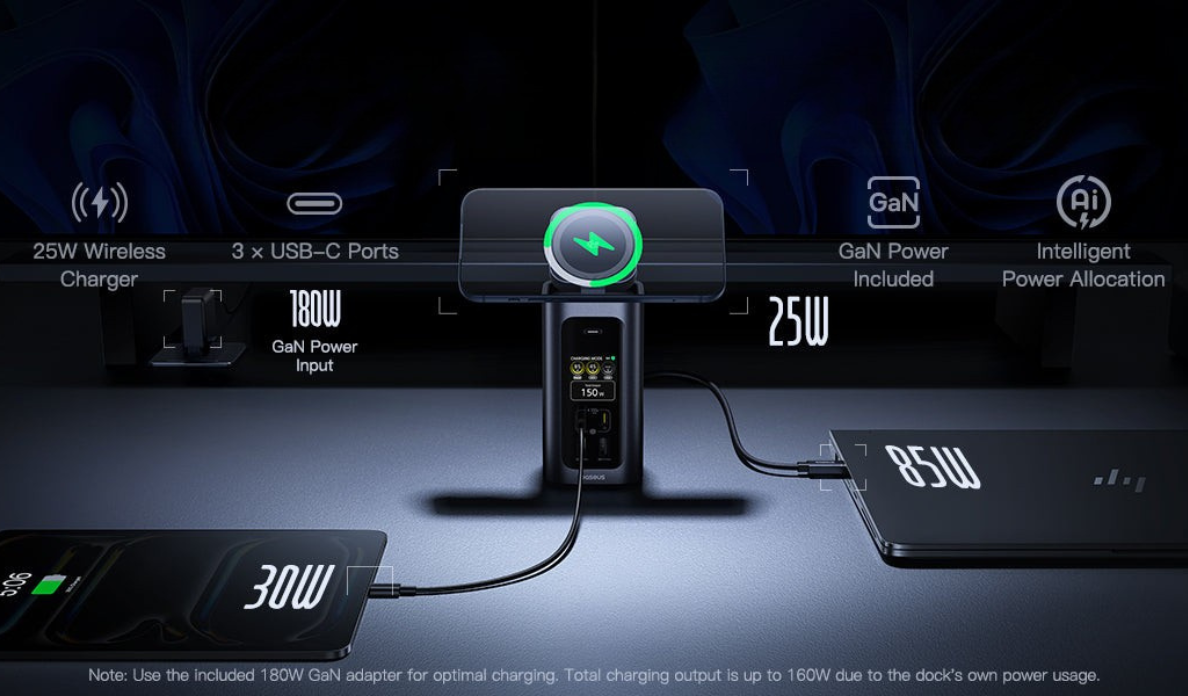
The Baseus Spacemate RD1 Pro 15 in 1 Win Docking Station sits between power management and workstation expansion.
It is not just a charger, and it is not just a basic hub. Baseus lists it as a 15 in 1 docking station with 160W total output, dual 100W USB C PD ports, and a Qi2.2 25W wireless pad. That combination lets it support laptop charging, device charging, wireless phone charging, and workstation connectivity in one setup.
This is where the idea of a docking station with wireless charging becomes useful. A phone often sits next to the laptop all day, so adding wireless charging to the dock helps reduce another cable on the desk. It turns the dock into a more complete device hub instead of keeping phone charging separate.
The 160W docking station positioning also matters because power demand is no longer limited to one laptop. A modern desk may include a laptop, phone, tablet, earbuds, and other accessories. Stronger total output gives the setup more headroom for multiple devices.
For users comparing docking station vs charging hub, the Spacemate RD1 Pro shows why the categories are starting to overlap. It manages power, but its larger purpose is still workstation expansion.
How to Choose Between Them
The easiest way to choose is to look at what you connect every day.
If your daily devices are mostly phone, tablet, earbuds, smartwatch, and power bank, a charging hub is probably enough. It gives you cleaner charging without adding features you do not need.
If your daily setup includes a laptop, monitors, external drives, keyboard, mouse, webcam, Ethernet, and phone charging, a docking station is the better fit. You need more than power. You need display support, data transfer, and a cleaner way to connect everything.
Think about where the product will live too. A charging hub works well in flexible spaces because it is mainly about charging. A dock works best when it stays at a desk and acts as the connection center.
Also think about future growth. If you are planning to add a monitor, external SSD, or wired desk setup later, buying a dock may make more sense than buying a charging hub now and replacing it later.
The right choice should make your workspace easier, not more complicated.
Conclusion
A charging hub and a docking station are both useful, but they are built for different jobs.
A charging hub is best when your main goal is to power several devices. It keeps phones, tablets, earbuds, watches, and small electronics charged from one place.
A docking station is best when your laptop needs to become a complete workstation. It connects monitors, storage, accessories, network, and power through one central setup.
That is the real difference in docking station vs charging hub. One solves charging. The other solves desk connectivity.
For users who want both power management and workstation expansion, the Baseus Spacemate RD1 Pro offers a practical bridge with its 15 in 1 docking design, 160W total output, dual 100W USB C PD ports, and Qi2.2 25W wireless pad.
Explore more workstation options in the Baseus hubs and docks collection.
FAQs
What is the difference between a docking station and a charging hub?
A charging hub is mainly designed to charge multiple devices. A docking station connects a laptop to a workstation with monitors, data ports, accessories, network access, and charging.
Do I need a laptop docking station?
You need a laptop docking station if you often connect your laptop to monitors, external drives, keyboard, mouse, Ethernet, or other desk accessories. It makes the setup cleaner and easier to use.
Is a USB C docking station better than a charging hub?
A USB C docking station is better for workstation use. A charging hub is better for simple multi device charging. The right choice depends on whether you need connectivity or just power.
What is a docking station with wireless charging?
A docking station with wireless charging combines laptop workstation expansion with a wireless charging area for a phone. This helps reduce desk cables and keeps the phone powered during the workday.
Who should choose a 160W docking station?
A 160W docking station is useful for users who need to power a laptop and other devices from one desk setup. It gives more total power headroom than a basic charging accessory.
Can a charging hub connect to monitors?
Most charging hubs are not designed for monitor output. If you need external displays, data transfer, and accessories, a docking station is usually the better choice.
Is the Baseus Spacemate RD1 Pro a charging hub or docking station?
The Baseus Spacemate RD1 Pro is a docking station. It includes strong charging features, such as 160W total output, dual 100W USB C PD ports, and Qi2.2 25W wireless charging, but it is built for workstation expansion.